

Hey Friends 👋 Happy Friday
Here’s another weekly dose of AI ways of working.
J. Moss, a technical co-founder and GTM operator, wrote about a pre-seed founder who has two people on his team. The second one is Claude. He doesn’t call it a tool. He calls it his technical co-founder.
Moss walked through the founder’s actual day in detail.
The founder sent 40 emails last week. Every single one was different. He got 11 replies. That’s 27.5% , in an industry where the 2026 benchmark sits at 3.43%.
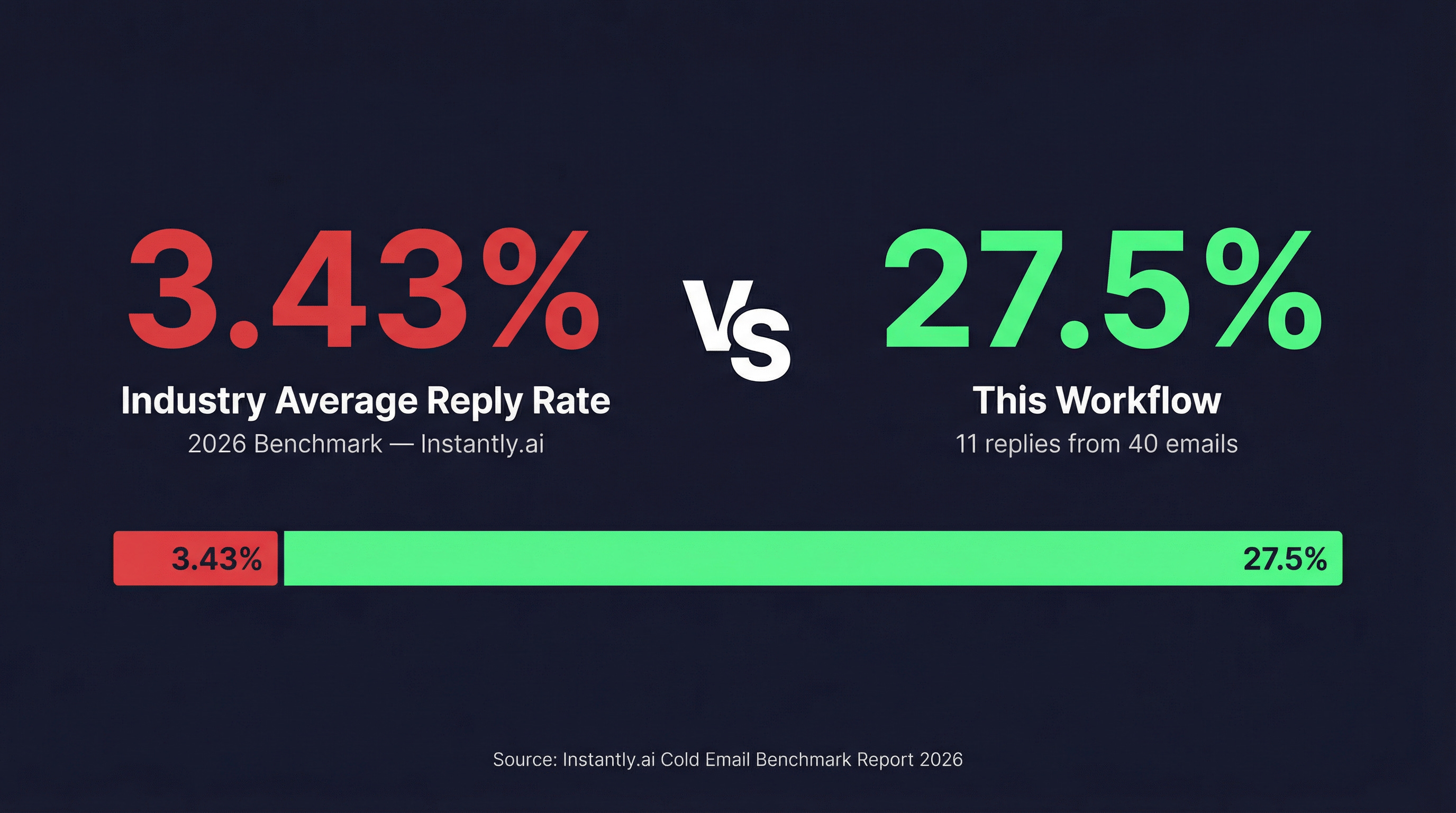
What this founder built is not a sales hack. It’s a demonstration of what AI operations actually looks like when someone treats Claude as a role, not a feature. And the skill that makes it work, breaking down a workflow, defining rules, reviewing outputs, is something every experienced manager already has.
Here’s exactly how he built it, and how you can set it up in 15 minutes.
Why This Only Works With Claude Code
Claude Code connects directly to your prospect lists, the live web, and your local files. It pulls the data itself. You don’t copy-paste anything.
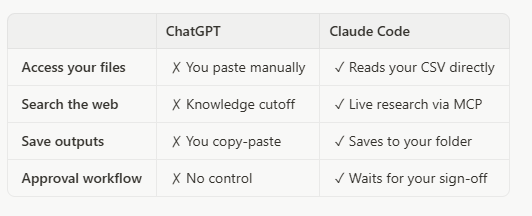
That’s why this works. You don’t need to understand how the MCP connection works. You need to understand what it gives you — an analyst who does the research before you review it.
What You’ll Build
In 15 minutes, you will have an operating environment where Claude researches each prospect and rewrites your base email for them — one at a time, with your approval at every step.
•Time to build: 15 minutes
•Time saved: 4+ hours per week
•Outcome: Personalised emails for every prospect, saved and ready to send
Step 1: Connect Your Tools (5 minutes)
What you need:
•Claude Code installed
•A free Tavily API key (get one at tavily.com — free tier covers ~1,000 searches per month)
How to connect:
Open your Claude Code project folder.
2.Create or open your .mcp.json file.
3.Paste the following configuration block:
{
“mcpServers”: {
“tavily”: {
“command”: “npx”,
“args”: [”-y”, “tavily-mcp”],
“env”: {
“TAVILY_API_KEY”: “your-api-key-here”
}
}
}
}
1. Replace your-api-key-here with your actual Tavily key.
2.Restart Claude Code.
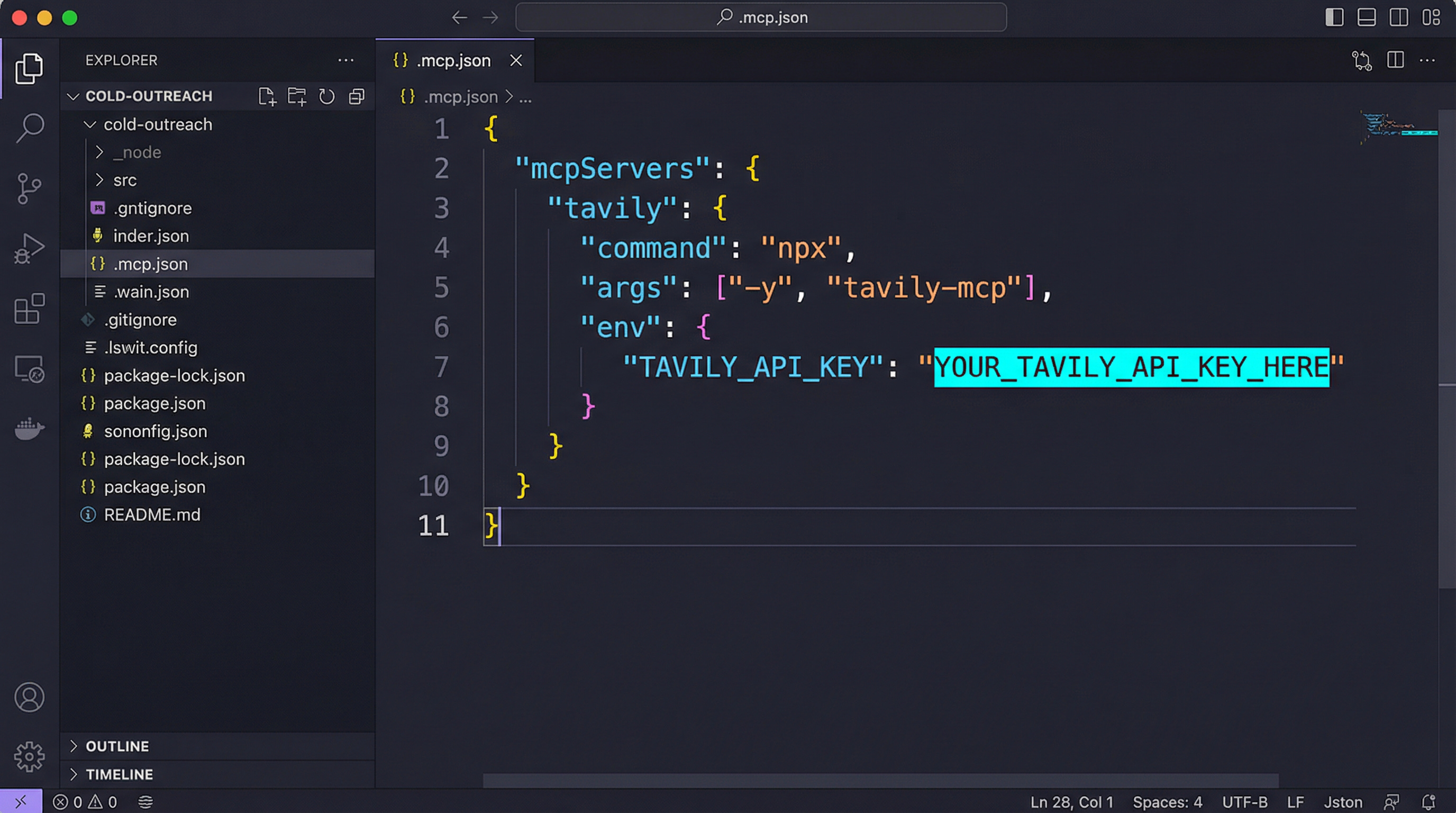
Operator Note: You are giving Claude Code live web access so it can research each prospect without you copying anything manually.
Step 2: Create Your Operating Environment (5 minutes)
Create a folder called /cold-outreach/. Inside, you need three files.
File 1: prospects.csv
A simple spreadsheet with these columns: Name, Company, Title, LinkedIn URL.
File 2: base-email.md
Your standard pitch. One draft. Keep it under 150 words. This is the template Claude will rewrite for each prospect.
File 3: CLAUDE.md — this is your operating environment. It loads every session and tells Claude exactly who you are, what you sell, and how to behave.
Copy this into your CLAUDE.md:
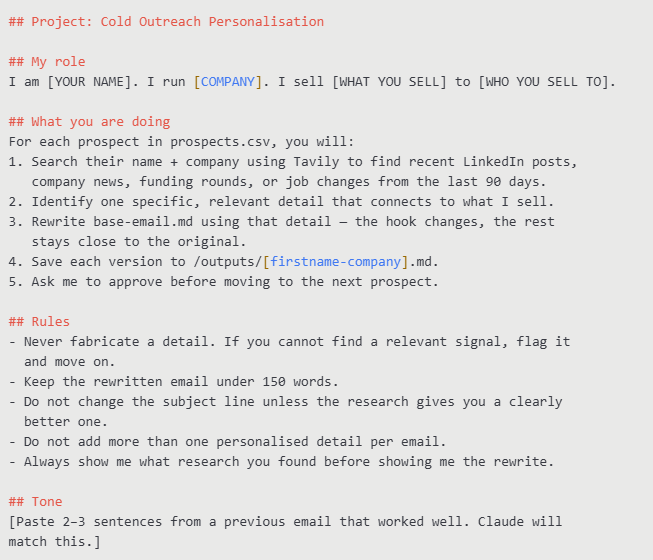
Adjust the workflow:
•Replace the [YOUR NAME], [COMPANY], and [WHAT YOU SELL] placeholders with your actual details.
•Add your tone examples at the bottom, this is what makes the output sound like you.
Step 3: Run It (5 minutes)
1.Open Claude Code in your /cold-outreach/ folder.
2.Type this single prompt:
Work through prospects.csv and personalise base-email.md for each one. Show me your research before each rewrite and wait for my approval.
Claude will read the first row of your CSV, search the web for that prospect, show you what it found, draft the email, and wait for your go-ahead before moving to the next one.
Review each version in /outputs/ before sending. You stay in control at every step.
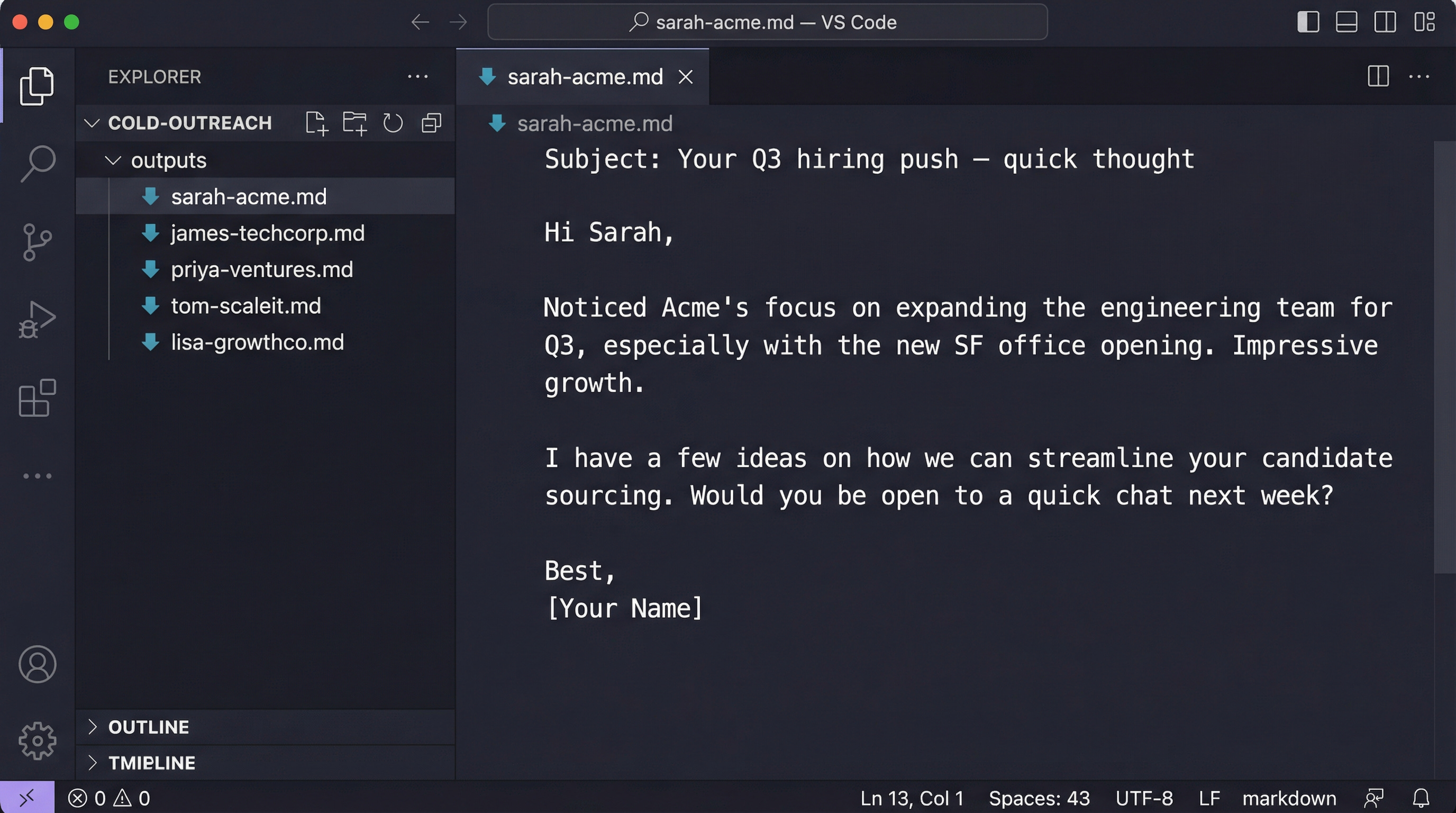
What You’ve Built
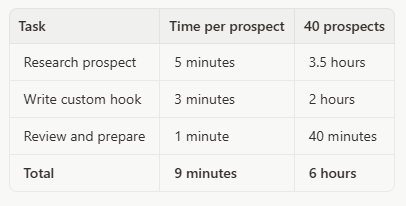
Before:
After:
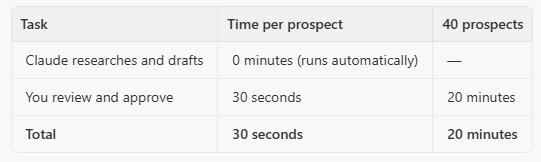
Time saved: 5.5 hours per week = 286 hours per year.
The real metric: 40 emails. 11 replies. 27.5% reply rate — against a 2026 industry benchmark of 3.43%.
What to Build Next
Once this is running, you can extend the same operating environment:
•Connect your CRM to automatically log sent emails and track replies without manual data entry.
•Add a signal monitor to trigger outreach automatically when a target company announces funding, a new hire, or a product launch.
•Build a follow-up sequence where Claude drafts a second-touch email based on whether the first one was opened.
Each of these is the same pattern: structure the context, delegate to Claude, review the output.
What You Just Learned: Context Engineering
You didn’t just automate a task. You learned context engineering.
Old Management:
•You wrote requirements.
•You delegated to a junior SDR.
•You followed up manually to check their research.
New Management:
•You structure context (what the agent needs to know, in CLAUDE.md).
•You delegate to Claude Code.
•You review outputs.
The skill is the same: breaking down what needs to happen and communicating it clearly. The tool changed. The management thinking didn’t.
This is why managers with a background in process design have an advantage most people haven’t noticed yet. You already know how to break down a workflow, define constraints, and review outputs. You’ve been doing context engineering for years. You just didn’t have an agent to run it.
One Ask
If you know someone using Claude Code in an interesting way, a workflow, a result, a setup that surprised you, reply and tell me. Every issue I feature one real example from someone in the operator community.
Subscribe for more AI Ops for Managers.
Sources:
•J. Moss. “He Calls Claude His Co-Founder. He Wasn’t Joking.” GTM AI Podcast / Substack. March 18, 2026. gtmaipodcast.com (Verified publicly accessible — no paywall. Contains the 40 emails / 11 replies claim verbatim.)
•Instantly.ai. “Cold Email Benchmark Report 2026.” January 12, 2026. instantly.ai
•Tavily MCP Server. GitHub. github.com/tavily-ai/tavily-mcp