

Hey Friends 👋 Happy Wednesday
Here’s another weekly dose of AI ways of working.
OpenAI shipped an official plugin on 30 March that lets you run Codex from inside Claude Code. If Claude Code is already where you plan, write, review and run work, you can now bring a second model into the same operating environment without changing tools.
I want to be precise about what follows. This dropped yesterday. I have not personally run every use case in this piece yet. This is what I can verify from the official announcement, the repository, and the early walkthroughs, translated for operators rather than developers.
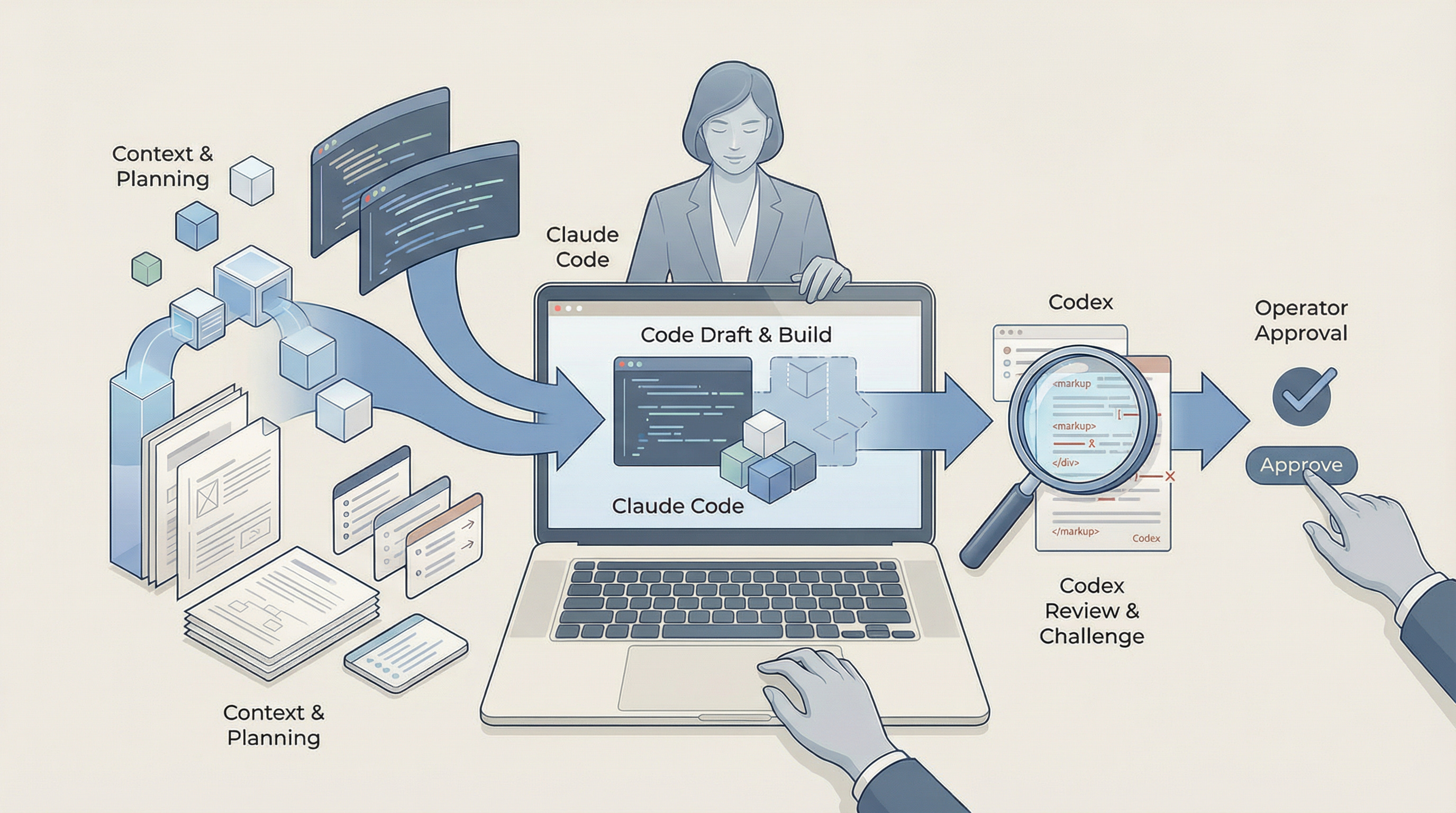
Claude Code can do the build and planning pass. Codex can review, challenge, or take a second pass before you approve the work. If your Personal OS already lives in Claude Code, Codex becomes the quality layer on top.
What Codex actually is
Codex is OpenAI’s answer to Claude Code: an AI coding agent that can write code, understand unfamiliar codebases, review work, debug problems, and run development tasks against files and project context. For a non-coder, the useful translation is simpler. Claude Code is the builder. Codex is the critic. Codex is particularly strong where you want a second set of eyes on bugs, logic errors, edge cases, and design decisions before something goes live.
That difference matters because it gives you diversity in the review layer. These are competing systems built by different companies, trained differently, and likely catching different issues. One model produces the first pass. The other tries to break it. You stay as the approver.
How to set it up
The setup is straightforward once the prerequisites are in place. The biggest likely friction point for a non-technical operator is Node.js 18.18 or later. Open your terminal and type node --version. If you see a number below 18.18 or get an error, download Node.js from nodejs.org before continuing.

The official repository and the AlphaSignal walkthrough point to the same install flow. The Codex CLI is the local command-line tool the plugin relies on to run Codex tasks from your machine. If you do not already have Codex installed, the setup flow can offer to install it for you automatically when npm is available.
/plugin marketplace add openai/codex-plugin-cc
/plugin install codex@openai-codex
Claude Code will ask where you want the plugin available: user, project, or local scope. If you are starting out, user scope is the simplest place to begin.
Then run:/codex:setupIf you see an error after /codex:setup, run:
/reload-plugins
Then retry the setup command. If Codex is installed but not authenticated, run !codex login and sign in with your ChatGPT account. Once you see “Codex is ready”, you are set.
The three commands operators actually need
You do not need every command on day one. The three that matter most map cleanly to operator work.
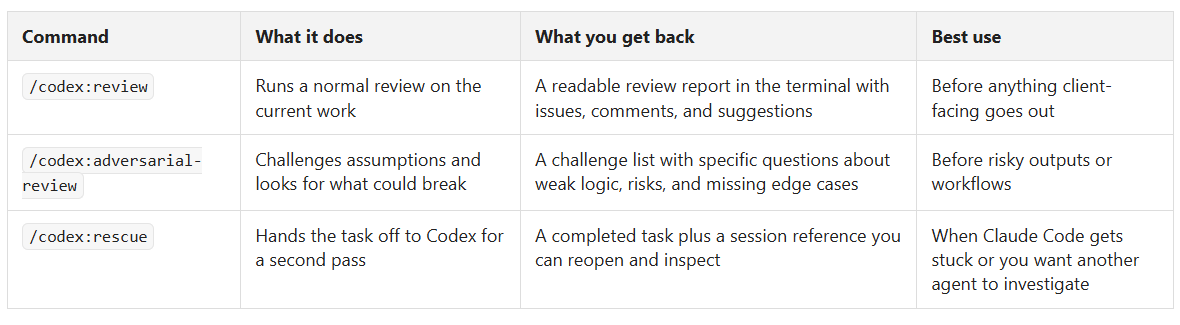
There is also a review gate setting that can stop Claude Code from finishing before a Codex review runs. I would not start there because it can create long loops and burn through usage limits quickly.
What this looks like in practice for non-coders
Most of the early coverage is written for developers. The useful gap is the operator translation.
Proposal review. Claude Code drafts a proposal using your files, rules and business context. Before it goes to a client, you run /codex:review. Type /codex:review and Codex reads the current output and returns its findings; you do not need extra instruction for a standard review. This works best when your CLAUDE.md already holds your proposal rules and client context, because Codex is reviewing against a standard rather than guessing at one.
Lead analysis. You drop a CSV or client notes into the project folder. Claude Code analyses them against your criteria. Then you run /codex:adversarial-review to pressure-test the assumptions. This gets better when your lead criteria and business definitions are already captured in context.
Content audit. Claude Code reviews emails, posts or documents against your tone and brand rules. Codex then checks the output and flags where the logic slips or the tone drifts. Without your voice rules and brand constraints in place, both tools are still guessing.
Workflow QA. You build a reporting flow or internal operating task in Claude Code. Before it goes live, you run /codex:adversarial-review to look for edge cases. This is strongest when your folder structure already maps the workflow properly, so Codex is testing a system with context, not a one-off instruction.
How this fits a Personal OS
If your Personal OS already runs on folder structure, business context and clear rules, Codex fits as the review layer, not the replacement layer. Claude Code still does the planning and execution against your context. Codex comes in after that to give you a second opinion from a different model family.
If you do not have that operating layer yet, start there first. I have covered that transition in a previous guide, and I will link the broader Personal OS walkthrough here once it is published. The plugin is most useful once your rules, files and working standards already exist in context.
That is the management shift here. The old way was one person drafting, checking and QA’ing alone. The new way is you structuring context, delegating the first pass to one agent, the second pass to another, and keeping approval for yourself. The management skill did not change. The execution layer did.
What to watch out for
There are four caveats worth keeping in view. First, there are two accounts and two usage limits. Claude Code usage sits with Anthropic. Codex usage sits with your ChatGPT account or OpenAI API key.
Second, Node.js is the likely friction point for non-technical operators.
Third, the review gate is not a beginner setting. Treat it carefully until you understand the loop it creates.
Fourth, this is still day one. Test it first in low-stakes work before you rely on it for anything sensitive.
Closing
If you are setting this up, reply to this post and let me know what you used it for first. I am more interested in the operator use cases than the developer ones.
If you are not on the Personal OS journey yet, that is where this starts. The plugin is not the system. It is the review layer on top of one, and I will share the broader guide once it is live.
Subscribe below to get the next one when it drops.
References
[1] Introducing Codex Plugin for Claude Code - OpenAI Developer Community
[2] openai/codex-plugin-cc - GitHub
[3] You can now trigger Codex from Claude Code! Here’s how - AlphaSignal